Palladium series icon MELLON · PALLADIUM

Documents,
done on your own computer.

Palladium is MELLON's family of document apps. Open, mark up, edit and organise PDFs. Everything is processed on your device and nothing is uploaded.

Free test version · macOS 11 or later · Apple silicon & Intel

Palladium PDF
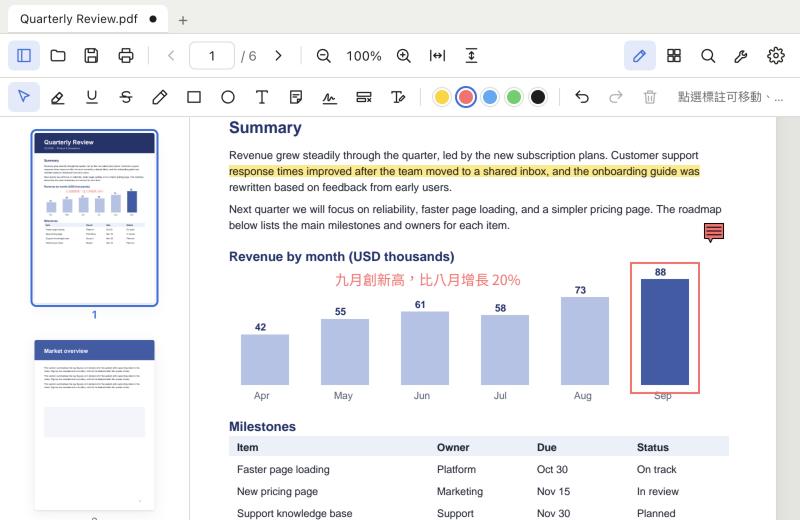
Palladium PDF with a highlighted sentence, a sticky note, a red box around a chart bar and Chinese text added to a report

Apps

The Palladium series, one app at a time.

Palladium PDF icon

Palladium PDF

Test version coming soon

View, annotate, edit and organise PDFs.

A fast, full-featured PDF app for Mac. Edit the text that is already in a document, fill forms, sign, redact, compress and protect, with an interface in English, 繁體中文 and 简体中文.

macOS 11+ · Apple silicon & Intel Windows: planned Free test version

More document apps are on the way

Palladium will grow with tools for everyday paperwork. Tell us what you need.

Tell us what you need →

What Palladium PDF does

Everything you need to work with a PDF, in one app.

View & search

Thumbnails, bookmarks, links, fit width or height, search with highlighted results, and tabs for several files at once.

Annotate

Highlight, underline, strike through, draw, add shapes, sticky notes and your signature. Move, resize and recolour them afterwards.

Edit the text

Click a paragraph and retype it. It re-wraps like normal text, in English or Chinese. Drag to move it, or click empty space to add text.

Organise pages

Reorder, rotate, delete, insert blank pages, merge other PDFs and extract pages.

Forms & signing

Fill text boxes, check boxes and drop-downs. Draw your signature once and reuse it.

Convert & export

Export pages as PNG or JPEG, extract the text, or turn images into a PDF.

Compress & protect

Make big files smaller, set an open password and permissions, or remove them.

Redact & print

Permanently remove sensitive content, and print just the pages you choose.
Private by design

Your documents are processed on your own computer and are never uploaded.

Works offline

No account and no internet connection needed to use it.

Three languages

Interface in English, 繁體中文 and 简体中文, and it handles Chinese text in your documents.

A look inside

Mark up a report, or reorganise its pages with a drag.

Palladium PDF with a highlighted sentence, a sticky note, a red box around a chart bar and Chinese text added to a report
Highlight, draw, add notes and text, including Chinese.
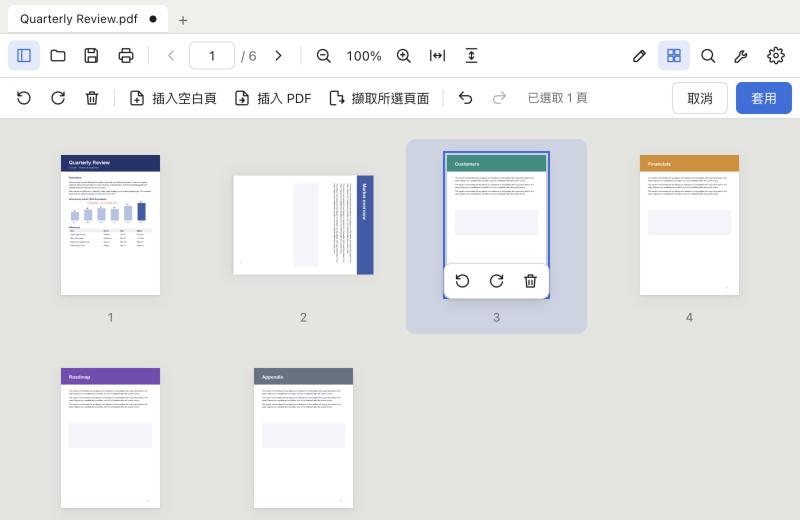
Palladium PDF page organiser showing six pages, one rotated and one selected
Reorder, rotate, delete and merge pages.

Download

Palladium PDF is in free testing. Download it, try it on your own documents, and tell us what to improve.

Palladium PDF icon

Palladium PDF

Test version coming soon

Email us to join the test list

Requirements

  • macOS 11 Big Sur or later
  • Apple silicon (M1 and later) or an Intel Mac
  • About 150 MB of disk space

Installing the test version

  1. 1

    Open the downloaded .dmg and drag Palladium PDF into Applications.

  2. 2

    Control-click Palladium PDF, choose Open, then click Open again.

  3. 3

    If macOS still blocks it, go to System Settings → Privacy & Security and click Open Anyway.

Test versions are not yet notarised by Apple, which is why macOS asks you to confirm. You only need to do this once.

Palladium series icon

Palladium Hub Test version coming soon

A small launcher for the series: shows which Palladium apps you have, and offers Download, Open or Update.

Test version coming soon

Questions

Is my file uploaded anywhere?

No. Palladium PDF runs on your computer and processes files locally. It does not send your documents to a server.

Is the test version free?

Yes. It is free to download and use while we test. Feedback is welcome at hello@mellongp.com.

Is there a Windows, iPhone or Android version?

The Mac version comes first. A Windows version is planned after the first test version, and mobile versions may follow.

Which macOS versions are supported?

macOS 11 Big Sur or later, on Apple silicon and Intel Macs.

Can it edit a scanned PDF?

Not yet. A scanned page is a picture, so there is no text to edit. You can still annotate, sign, reorder, redact and compress it.